Smart Scheduling

Build a roster that reflects the work, not just the calendar.

Smart scheduling illustration — a multi-role roster with availability, conflicts and outlet coverage connected in one planning view.

Inside helps managers plan shifts around roles, skills, availability, leave and operating needs — then publish changes directly to the frontline team.

Book a scheduling demo

A workable roster has more constraints than rows and columns.

A schedule must place the right person into the right role and time while accounting for availability, approved leave, overlapping work, rest periods and operating coverage. Spreadsheets show the final grid but do not manage the decisions behind it. Inside gives managers a structured scheduling workspace with the employee and workforce context needed to make those decisions more clearly.

How it works

  1. Set the operating structure. Configure locations, departments, roles, shift templates and relevant rules.
  2. Capture workforce inputs. Bring employee roles, availability, leave and employment information into the planning view.
  3. Build the roster. Create shifts manually, use templates or apply assisted assignment workflows available in the deployment.
  4. Review exceptions. Check overlaps, missing role coverage, availability conflicts and relevant overtime or rest alerts.
  5. Publish and manage changes. Release the roster, notify employees and handle swaps or replacements as work changes.

Capabilities

  • Weekly and daily roster views
  • Shift creation, editing and copying
  • Recurring shifts and schedule templates
  • Role-aware assignments
  • Skills-aware matching where configured
  • Availability and preference capture
  • Leave visibility during scheduling
  • Conflict and overlap alerts
  • Overtime and rest-period alerts where configured
  • Shift-swap requests
  • Replacement workflows
  • Draft and published schedule states
  • Employee notifications
  • Multi-department and multi-location structures

Value by persona

Department managers

Spend less time rebuilding the roster and chasing availability across messages.

Operations leaders

See workforce coverage and unresolved schedule issues across the operation.

HR teams

Keep leave and employee information closer to schedule decisions.

Employees

Receive a clearer, current schedule and a structured way to request changes.

Scheduling is more useful when it continues beyond publish.

In Inside, the published shift becomes the reference point for attendance and timesheet review. Managers can compare what was planned with what happened instead of treating the roster as a separate file that becomes obsolete after the week begins.

Frequently asked questions

Can Inside detect scheduling conflicts?+

Inside can surface issues such as overlaps, availability conflicts and relevant rule exceptions according to the organisation's configuration.

Can employees update availability?+

The employee mobile experience can support availability information and schedule-related requests based on the organisation's workflow.

Does Inside create the full roster automatically?+

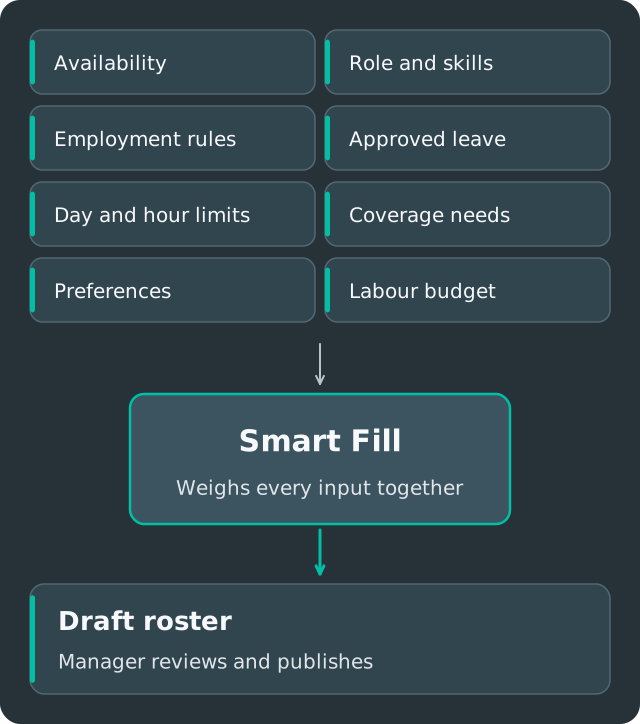
Inside builds an assisted first draft from your roles, availability, leave and operating rules, then the manager reviews and publishes it. You keep control of the final schedule.

Can Inside schedule multiple departments or outlets?+

Yes. Inside supports organisational structures such as properties, departments, roles and outlets. Exact cross-location rules are configured during implementation.

Bring your weekly roster into one connected workflow.

Book a scheduling demo