Casual Workforce

Fill casual shifts without the calls, chats and spreadsheets.

Inside Casuals Hub manages casual staffing from the gap to the payslip. Managers raise a request from a template or from scratch, approvers release it to the right labour source, casual workers accept offers in the Inside casual app and clock in with a day pass, and confirmed hours flow into casual pay or agency billing.

Casual staffing still runs on phone calls.

A banquet is confirmed, a server calls in sick, a weekend gets busier than planned. Someone messages casuals one by one, chases agencies, keeps a list of who said yes, and then checks paper sign-in sheets against the invoice at month-end. Nobody can see what's been requested, who's coming or what it will cost.

One request, from gap to pay.

  1. Request. A manager raises a casual request for a role, date, time and number of people, from a saved template or a custom request.
  2. Approve. Approval rules decide who signs off. Requests that aren't approved before the shift ends expire on their own.
  3. Offer and fill. Approved slots go to your internal casual pool, your favourites or one or more agencies. Casuals accept the offer in the app; managers accept or decline pending offers.
  4. Work the shift. The casual gets a day pass and clocks in on the app or by QR scan at the outlet. Managers see who's on duty.
  5. Pay or bill. Confirmed hours flow into the casual timesheet and on to casual pay, or into the agency's billing.
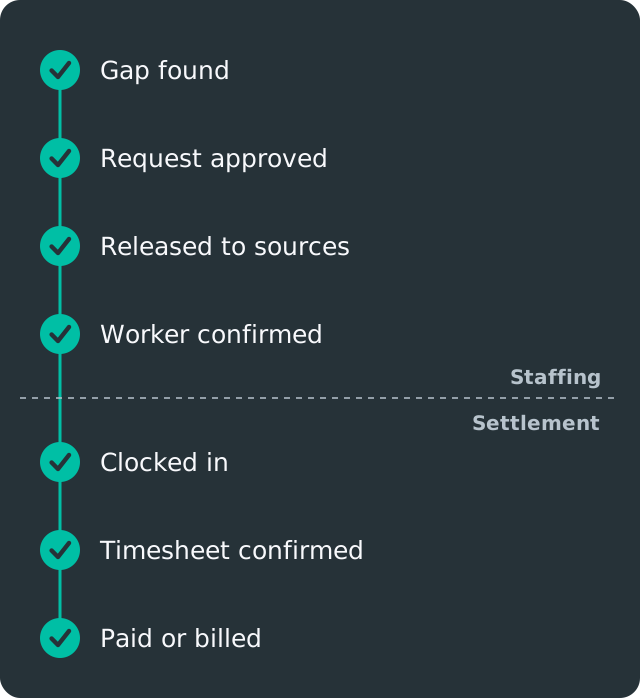
Gap found, request approved, released to labour sources, worker confirmed, clocked in, timesheet confirmed, then paid or billed to the agency. The first four stages are staffing; the last three are settlement.

What's included

  • Casual requests and templates

    Raise requests for a role, date, time and headcount, or reuse a template for recurring needs like weekend brunch or banquet set-up. Batch requests cover several roles in one go.

    Used by: outlet managers, banquet and event teams

  • Approval rules

    Set who approves casual requests and when approval is needed, so spend is controlled before an offer goes out. Unapproved requests expire after the shift, so nothing lingers.

    Used by: department heads, operations, finance

  • Your internal casual pool and favourites

    Keep your own bench of trained casuals, mark favourites who know the outlet, and offer shifts to them first. They see offers in the Inside casual app and accept with one tap.

    Used by: managers, casual workers

  • Open, Reserved and Exclusive sharing

    Share one request with several agencies and decide how slots are allocated: open to all, reserved for one agency for a time, or exclusive. Reserved slots can be released if they aren't filled.

    Used by: operations, procurement

  • Day pass, clocking and casuals on duty

    Each casual gets a day pass for the shift and clocks in on their phone or by QR scan. Managers see which casuals are on duty and can scan them in from the manager app.

    Used by: managers, casual workers

  • Casual timesheets and pay

    Hours are matched to the shift, confirmed and flow into casual pay. Charge rates and pay rates are kept separate, so you know both what a shift costs and what the worker earns.

    Used by: payroll, finance
What each team gets

  • ManagersRaise a request in a few taps and see who's coming.
  • Casual workersOffers, day passes, clocking and pay history in one app.
  • OperationsOne view of every open, filled and expired request across outlets.
  • FinanceCasual spend is approved before it happens and traceable to the shift.

Frequently asked questions

Do casual workers need to download an app?

Yes, the Inside casual app. They use it to accept offers, get their day pass, clock in and see their work history.

Can several agencies see the same request?

Yes. You choose whether a request is open to all your agencies, reserved for one for a period, or exclusive to one agency.

How are casual workers paid?

Internal casuals' confirmed hours flow into casual pay in Inside. Agency workers' hours flow into the agency's billing instead.

What happens to requests that aren't approved?

They expire after the shift ends, so nobody is offered a shift that was never approved.

Can we offer shifts to our regular casuals first?

Yes. Mark them as favourites and offer to your internal pool before any agency sees the request.

See how Inside fits the way your operation runs.

Tell us about your outlets, workforce mix and current tools. We'll show you the workflows that matter to your team.